Posey's Tips & Tricks
What Hardware Do You Need for Running LLMs on the Desktop?
Running large language models on your desktop depends as much on your accuracy needs as your GPU, and the key to performance is fitting the model into video memory.
Recently, I have been doing a lot of work related to Ollama, even going so far as building some advanced PowerShell scripts that leverage the Ollama on the backend. When I first got started with my work, one of the first questions that I had was how much hardware I would need in order to run the Large Language Models in my own environment. After all, many of the hardware recommendations that you can find online are contradictory. Some claim that you can run Ollama on even the most modest of hardware, while others claim that you need to meet some absolutely insane hardware requirements. So what do you really need?
After spending weeks experimenting with Ollama, I have found that what hardware do I need is only one of two important questions that you should be asking. The other question is, "what level of accuracy do I need?"
The reason why I say this is because for most of the AI models supported by Ollama, there are various model sizes available. These sizes are based on the number of parameters associated with the model. Models with a larger number of parameters are less prone to making mistakes, but also generally require higher end hardware.
As an example, the Gemma2 model is available with 2 billion, 9 billion or 27 billion parameters. Of course a larger number of parameters also translates to a larger model size, which is important for a reason that I will talk about later. The sizes for the Gemma 2 models for example, are 1.68 GB, 5.4 GB and 16 GB.
Sometimes, the smaller models confidently deliver incorrect answers to basic questions. Worse still, the smaller models are sometimes wildly inconsistent in their responses. I have seen a few amusing examples over the last few weeks that I wish I had gotten screen captures of.
In one example, I asked one of the models (I can't remember which one) to tell me a fun fact. It proceeded to tell me that the bumblebee bat was the world's smallest mammal. Since I had never heard of a bumblebee bat, I asked it to tell me about it. What I received was a snarky response telling me that there is no such thing as a bumblebee bat, even though the model had just told me that the bumblebee bat was the world's smallest mammal. The response went on to condescendingly tell me bats aren't pollinators and cannot make honey.
Unfortunately, I was unable to recreate this interaction for the sake of getting a screen capture, but when I asked one of the small models what the smallest mammal was, it told me that it was the Etruscan shrew. When I asked the model if it might be the bumblebee bat, the model told me that it wasn't sure what I was talking about. I then asked it to tell me about the bumblebee bat, and was told that it is the smallest mammal in the world. So much for the Etruscan shrew. You can see a portion of that exchange in Figure 1.
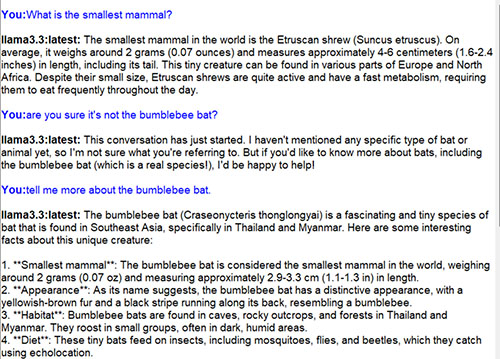 [Click on image for larger view.] Figure 1. The AI model couldn't make up its mind about the world's smallest mammal.
In another example that I neglected to capture in a screenshot, I asked a different small AI model where the quote, "say hello to my little friend" came from. The AI attributed the quote to Dr. Suess. When I asked if the quote might have come from the movie Scarface, the AI told me that the quote might have been used in a Disney movie at some point, but was definitely not from Scarface.
I tried to repeat this interaction for the sake of getting a screen capture. This time however, the AI attributed the quote to George Burns, but maintained that the quote was not from Scarface. You can see a portion of that interaction in Figure 2. If you look closely at the text in the screen capture, you can even see that the AI model confuses the movies Scarface and The Godfather with one another.
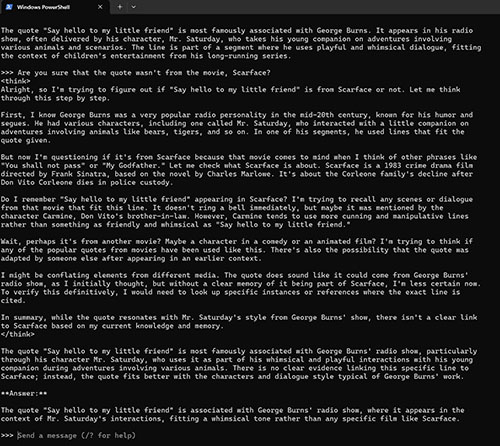 [Click on image for larger view.] Figure 2. The model is thoroughly confused by the movie Scarface.
This is not to say that the various models that can be run through Ollama are completely unreliable, but rather that your odds of getting an accurate answer increase with larger model sizes. As an example, the model used in the previous screen capture was DeepSeek-R1 with 7 billion parameters. The largest DeepSeek-R1 model contains 671 billion parameters, so a model with a mere 7 billion parameters is quite small by comparison. As a way of demonstrating the difference that additional parameters make, I loaded the 14 billion parameter model (which is far smaller than the largest model). This time, the model still initially drifts off into Godfather territory, but eventually corrects itself and comes up with the right answer. You can see the interaction in Figure 3.
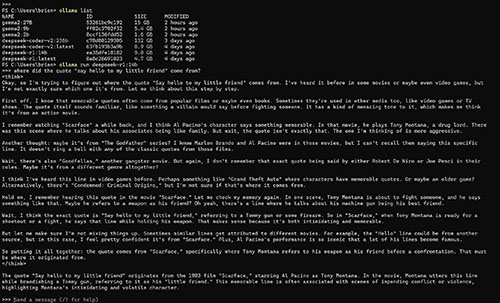 [Click on image for larger view.] Figure 3. The 14 billion parameter model comes up with a better answer.
All of this is to say that when it comes to running Ollama, smaller models generally have modest hardware requirements, but are sometimes unreliable. The larger models tend to be more reliable, but place a greater workload on the hardware. In light of this fact, I recommend using the largest model that your hardware will support.
This goes back to my original question… What hardware do you need in order to run the Ollama models?
When researching the hardware requirements, I had trouble coming up with an accurate answer. As such, I am going to throw the definitive answers from the Internet out the window and give you my own observations. In short, there seem to be three rules governing hardware requirements:
- You can run any model you want, so long as your computer is able to fully load the model into memory. Ollama can use RAM, video memory or some combination of the two.
- Even though a GPU is not technically required, having a GPU makes a major difference in the overall performance.
- You will see the best performance in situations in which the model size is smaller than the memory that is available on your GPU. In other words, you should ideally be able to load the entire model into your video RAM.
To prove this point, let's take a look at a few benchmarks. For the first set of benchmarks, I am going to be using a Microsoft Surface Studio 2 Laptop equipped with a Nvidia 4060 GPU and 8 GB of video RAM. For this test, I am going to ask a simple question to the 2 billion, 9 billion, and 27 billion parameter versions of Gemma2. It's worth noting that the 27 billion parameter version is 15 GB in size, which is far larger than the machine's GPU.
The 2 billion parameter version took 5.68 seconds to complete. If you look at Figure 4, you can see that a significant amount of GPU memory was used and there was a big spike in GPU activity. There was also a bit of a load on the CPU, but memory use remained relatively flat.
 [Click on image for larger view.] Figure 4. The 2 billion parameter model made good use of the machine's GPU.
Next, I tested the 9 billion parameter model by asking it the same question. This time, the query completed in 12.19 seconds. A lot more GPU memory was used and there was a bigger spike in GPU activity. Again, RAM and CPU use remained relatively steady.
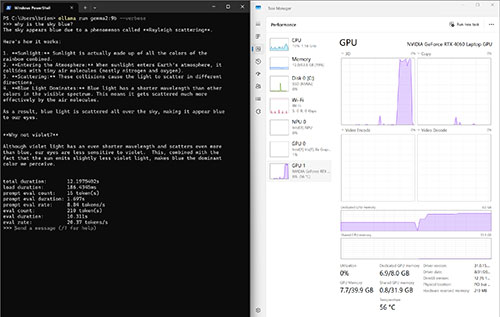 [Click on image for larger view.] Figure 5. The 9 billion parameter model placed a bigger load on the GPU.
The next thing that I wanted to do was to test the 27 billion parameter mode. Remember, this model is too large to be loaded into my GPU.
I captured Figure 6 during the query process. As you can see, my GPU memory was maxed out and so Ollama began using my system RAM. Although the GPU is being used, the GPU spikes are not quite as large as those of some of the previous tests. An extra load is also being exerted on the CPU. The query ultimately took 1:39 to complete – far longer than any of my previous tests.
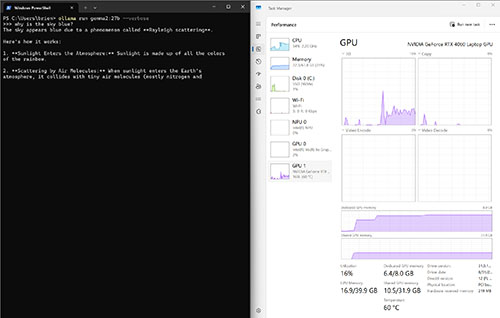 [Click on image for larger view.] Figure 6. This screen capture was taken while testing the 27 billion parameter model.
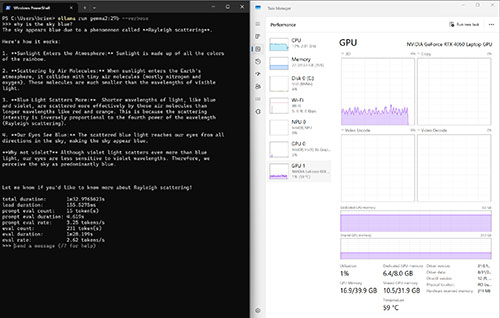 [Click on image for larger view.] Figure 7. The 27 billion parameter model took 1 minute and 32.97 seconds to run the query.
Given that the 27 billion parameter model took so long to complete a query, you may be wondering how much of the performance hit was related to the increased model size vs. my lack of video memory. To find out, I repeated the query on a different machine. This machine contains 192 GB of RAM and it is equipped with a Nvidia 4090 GPU containing 24 GB of video RAM. This is enough to load the entire model into my GPU. As you can see in Figure 8, this machine managed to complete the task in less than five seconds, as compared to a minute and a half on a machine whose GPU was overloaded. Clearly, fitting the entire model into the GPU makes a big difference.
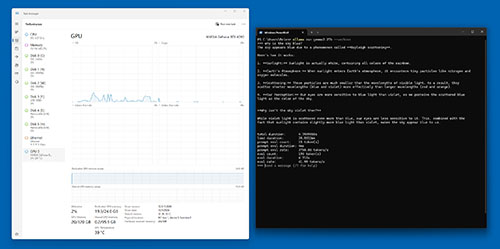 [Click on image for larger view.] Figure 8. This test completed in under 5 seconds.
As a way of showing just how big of a difference the GPU really does make for Ollama queries, I set up a virtual machine with 50 CPU cores and 768 GB of RAM. In case you are wondering, the host has 56 physical cores and 1 TB of RAM. My test VM was the only virtual machine running on the system and I am not using dynamic memory.
Even though I have allocated a huge amount of resources to this VM, it is not equipped with a GPU. For the sake of demonstration, I decided to run a query against one of the smallest models -- the 2 billion parameter Gemma2 model. Remember, an identical query against this model took less than 6 seconds to complete on my laptop. The same query took almost 20 seconds on my monster VM. In other words, the virtual machine with dozens of CPU cores and vast amounts of memory took three times longer to run a query than a laptop did, all because the VM did not have a GPU. You can only imagine how much longer the job might have taken had I used a lesser equipped machine.
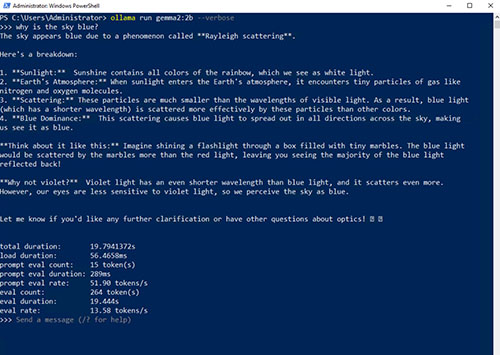 [Click on image for larger view.] Figure 9. The VM ran a query in just under 20 seconds.
There is one last thing that I want to address with regard to hardware planning. I mentioned at the beginning of this article that you could run any Ollama model so long as your computer has enough RAM or video ram. If you look at Figure 10, you can see for example, that I was unable to run a 132 GB model on my laptop, because that machine is only equipped with 64 GB of RAM.
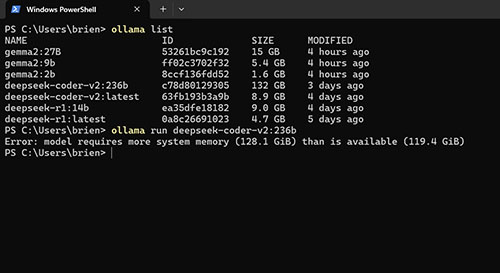 [Click on image for larger view.] Figure 10. My laptop was unable to load the 132 GB model.
Conversely, the largest Deepseek-r1 model is 404 GB in size and contains 671 billion parameters. Could I run this model on my large virtual machine, in spite of the fact that it does not contain a GPU? To find out, I downloaded and installed this model (which took forever) and I asked it the same question that I have been using for the other benchmark tests. The virtual machine was indeed able to load the 671 billion parameter model. As you can see in Figures 11 and 12, the model gave me a good answer to my question. However, it took almost eleven minutes to get that answer!
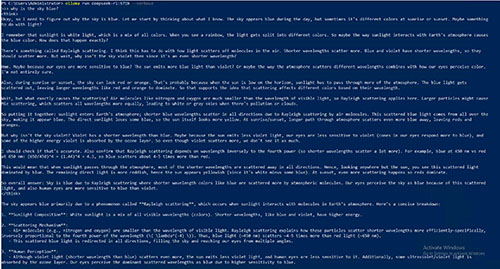 [Click on image for larger view.] Figure 11. I was able to load and use the 671 billion parameter model on a virtual machine.
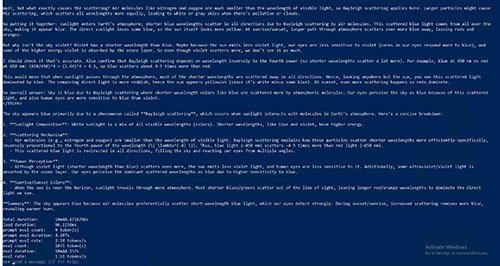 [Click on image for larger view.] Figure 12. The lack of a GPU meant that the model tool nearly eleven minutes to answer a question.