Posey's Tips & Tricks
Taking Hyper-V Health Monitoring to the Next Level, Part 1
A new PowerShell-based Hyper-V health tool goes beyond replication status to estimate whether a VM is actually ready for a successful failover.
A couple of months ago, I ran into some problems with Hyper-V replication and consequently decided to build a PowerShell script that was designed to detect replication failures and other common problems. Now that I have been using the script for a while, I can confirm that it works beautifully and does exactly what it is supposed to.
Even so, I came to the realization that when it comes to Hyper-V replication, there are two questions that really matter. My previous script did a great job of answering one of those questions. That question was, "is the replication process working the way that it should?" However, the script does little to answer the second question. That question is, "If I had to fail over a VM right now, what are the odds that the failover would actually work?"
I decided to build a PowerShell script to help me to answer that second question. The script proved to be far lengthier and more complex than I expected, but I am happy with the results. More importantly, I am eventually going to be using the functions contained within my script in an entirely new tool that I am developing. That tool is going to assist with server monitoring and capacity planning. I mention this because although the tool that I have created works, the output isn't nearly as fancy as some of the other tools that I created.
So what does my new tool do? I made a list of all of the things that I could think of that might potentially prevent a failover from being successful. I then wrote a script that checks for all of those conditions and that creates a score estimating the odds that a failover will succeed. The script also details any conditions that might need to be addressed in order to improve the odds of a successful failover.
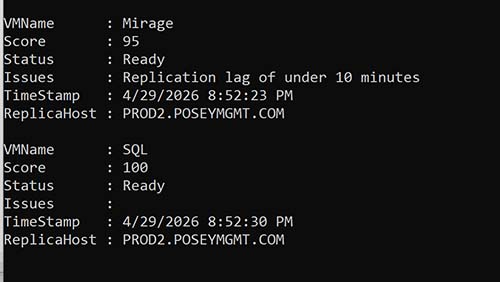
If you look at Figure 1, you can see a summary displaying the health information for a couple of my VMs. Notice that each VM has received a score ranging from 0 to 100, indicating how likely the VM would be to failover successfully. Just beneath the score, you will see the VM's current status (is it ready for a failover or not) and any issues that have been detected.
 [Click on image for larger view.]
Figure 1. These virtual machines can likely be failed over successfully.
[Click on image for larger view.]
Figure 1. These virtual machines can likely be failed over successfully.
So now that I have spent some time talking about what my script does, I want to turn my attention to the eight health checks that the script performs in an effort to determine whether or not the VM can be failed over.
Replication Health
The first thing that the script checks is replication health, as reported by Hyper-V. If Hyper-V reports that the VM's replication health is normal, then the script awards 30 points. If the VM is in a warning state, then only 10 points are awarded. If the VM is in a critical state, then no points are awarded. Additionally, there is a $CriticalFailure variable that I set to True. I use this variable to indicate that a condition exists that renders a failover impossible. I actually had a tough time deciding on whether to designate a critical state as a critical failure because technically, a failover may still be possible, albeit with at least some data loss. Ultimately however, I decided to treat a critical state as a critical failure.
The second condition that my script checks for is replication freshness. In other words, how long has it been since the last successful replication cycle. If a replication cycle has successfully completed within the last five minutes, then 10 points are awarded. If it has been between five and 10 minutes, then five points are awarded, but a warning is issued. If the last successful replication was more than 10 minutes ago, then no points are awarded.
The third test checks for network connectivity. This test is a little bit on the complicated side, but effectively, I am checking to see whether or not each NIC is connected to an external virtual switch. The score is calculated by dividing the number of valid NICs (NICs that are connected to a switch) by the total number of NICs that have been detected and then multiplying the answer by 10.
In part 2 of this series, I will tell you about the remaining health checks that my script performs. I will also share the source code with you at the end of the post.
About the Author
Brien Posey is a 22-time Microsoft MVP with decades of IT experience. As a freelance writer, Posey has written thousands of articles and contributed to several dozen books on a wide variety of IT topics. Prior to going freelance, Posey was a CIO for a national chain of hospitals and health care facilities. He has also served as a network administrator for some of the country's largest insurance companies and for the Department of Defense at Fort Knox. In addition to his continued work in IT, Posey has spent the last several years actively training as a commercial scientist-astronaut candidate in preparation to fly on a mission to study polar mesospheric clouds from space. You can follow his spaceflight training on his Web site.