Q&A
How To Get Started with Copilot Automation Without Losing Control
Stephen L. Rose explains how IT teams can turn Copilot automation into practical productivity gains while keeping agents, connectors and data access under control.
For enterprise IT teams, Copilot automation is no longer just a user productivity feature. It's quickly becoming another layer of business process automation that must be planned, secured and governed like any other enterprise system. The early challenge is not simply teaching users how to build agents or write better prompts, but identifying use cases that deliver measurable value, understanding how Copilot interacts with permissions and making sure automation does not turn into another source of shadow IT.
In this Q&A, Stephen L. Rose, an AI adoption and change management strategy consultant, discusses how organizations can identify low-risk Copilot automation scenarios, improve prompt quality, govern agents and keep users focused on real operational problems. Rose will cover those issues in more detail during his TechMentor and CyberSecurity Live! session, "Unlocking the Power of Copilot Automation: A Beginner's Guide," taking place Aug. 5 at Microsoft headquarters.
Make your plans to join us and Rose for this year's TechMentor and CyberSecurity Live! Save $400 when you register by June 5.
Redmondmag: For orgs just getting started, what are the best first Copilot automation scenarios to prove value without creating unnecessary risk?
Rose:It's simpler than you might think. I start by teaching end users to schedule a prompt as their first automation step. I'm always surprised how many people don't realize this feature exists, especially because it's one of the fastest ways to turn Copilot from "something I try occasionally" into "something that helps me every week."
The idea is straightforward: pick a recurring moment (end of day, Monday morning, Sunday evening) and have Copilot automatically pull together the information you typically chase down manually -- calendar context, recent email threads, Teams chats, shared files and open action items. Instead of asking people to adopt a new process, you're simply replacing the busy work of collecting updates with an automated recap.
This is also a low-risk starting point because it's read-focused. You're not asking Copilot to change systems of record, create tickets, move files or update customer data. You're using it to summarize what you already have access to; in the tools you already use. That makes it easier to demonstrate value quickly, while keeping governance and change management manageable. It also sets you up for success when then teaching them how to use Agent Builder as their next step.
Below is the prompt I schedule on Sunday evenings to get ready for the week ahead. It helps me spot urgent threads, meetings that need pre-work, items that are at risk of slipping, and the handful of decisions I'll need to make early in the week.
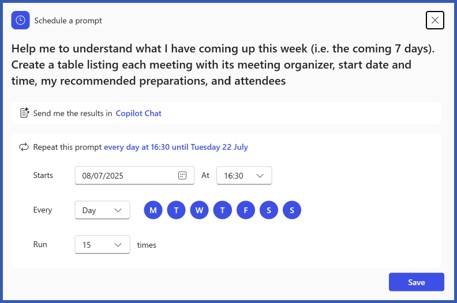 Figure 1.
What makes a Copilot agent genuinely useful rather than just another chatbot layered on top of existing information?
Figure 1.
What makes a Copilot agent genuinely useful rather than just another chatbot layered on top of existing information?
In short: flexibility. A good agent lets you launch multi-step work with a single prompt by combining connectors, prompts, workflows/flows, REST APIs and more.
- Connectors link your agent to Microsoft services and hundreds of third-party apps (for example, ServiceNow, Jira, Autodesk, Awork, Box, Discus and Egnyte). You can also build custom connectors when no prebuilt option exists.
- Prompts can call other prompts, letting you standardize and reuse building blocks instead of maintaining disconnected bots.
- Workflows (flows) can be chained to create an end-to-end solution that runs the way you want, for example, generating an SOW, routing a sales lead or kicking off invoicing from one trigger.
- From there, you can add REST APIs or Model Context Protocol (MCP) integrations to connect the agent to data wherever it lives -- bringing structure and intelligence to that information.
Prompt quality is a major part of Copilot success. What separates an average prompt from one that reliably improves productivity?
Great question. The reason so many people are dissatisfied with tools like Copilot is twofold. First, unlike other AI tools, with Copilot you can (and should) work with the agent inside of the app you're working with. Ask Excel questions inside Excel, Email in Outlook, etc. for the best results and to have the answer imbedded into the content.
Second, it is the quality and structure of your prompt. Are you clearly telling Copilot what you want? I recommend the following four things to keep in mind for every prompt.
- Goal: What response should look like.
- Context: Why do you need this? What audience or level should it be geared at?
- Source: Where should I get this data from
- Expectations: What are the parameters for success for you?
What should IT teams understand about data access, permissions and visibility before connecting agents to internal systems?
Before you connect an agent to anything internal, the big mindset shift is the agent doesn't get "magic access." It acts through an identity (usually the user, sometimes a service account), and it can only see what that identity is allowed to see. So, if your SharePoint/Teams/OneDrive permissions are messy, or you've got lots of "everyone except external users" links floating around, the agent will happily surface that content too -- because from its perspective, it's just doing search and retrieval on what's already visible.
Next, get super clear on how permissions are actually enforced end-to-end: where inheritance breaks, where you rely on groups, what's "public" vs "private," and how external sharing is handled. This is where oversharing usually shows up (public sites, broken inheritance, broad groups, unlabeled content), and agents tend to make it more obvious because they're great at finding things. A quick pre-flight you'll thank yourself for: pick a few realistic user personas, run the agent against the same scenarios and confirm the answers only include what those personas should see.
Finally, don't skip the "so what happens when it goes wrong" stuff: logging, auditing and guardrails. Make sure you can answer basic questions like "who queried what and when," "what data sources did the agent touch," and "can we turn off or narrow a connector fast?" And if the agent can take actions (create tickets, update records send messages), treat it like any other integration: least-privilege permissions, scoped connectors, approval steps for risky actions and a clean way to rotate credentials without breaking everything.
How can organizations track, manage and secure Copilot Agents over time so they do not become unmanaged automation sprawl?
- Inventory / catalog: Maintain one list of all agents (owner, purpose, connectors/data, environment, last updated, audience). No catalog entry = no deployment.
- Identity + least privilege: Define the run-as identity (user vs service) and keep access minimal. Fix broad groups/broken inheritance and enforce MFA/Conditional Access for automation identities.
- Connector controls: Approve connectors up front and route new ones through a quick review. For HR/finance/CRM, add extra gates (separate environments, allow lists, read-only first).
- Logging + auditing: Be able to see who ran it, what touched, what it did, and what failed. Alert on weird patterns (usage spikes, sensitive access, repeated errors, new connectors).
- Lifecycle (no "set it and forget it"): Review regularly (monthly/quarterly): owner, purpose, access, usage. Archive/disable anything stale. Version changes and require lightweight approval for anything that writes to systems of record.
How should business leaders, IT admins, and end users collaborate so Copilot automation solves real operational problems rather than becoming a novelty?
Start by asking end users where time gets burned. The best early wins are repetitive, annoying tasks, chasing updates, finding the right doc, copying info between tools, or tracking a clunky process. Agents (or PowerApps) should remove that busy work and give people time back for the work that matters.
Think of it as a three-way handshake: leaders pick the problems worth solving, IT makes it safe and supportable, and end users keep it grounded in reality. Leaders bring a short list of "painful, repeatable" workflows (status reporting, meeting follow-ups, intake triage, doc drafting) and define success in plain terms (time saved, fewer handoffs, faster turnaround, fewer errors). IT turns that into guardrails -- approved data sources/connectors, identity and permissions, logging and a support plan -- so teams can build without creating risk or chaos. End users do the last mile: they test early versions with real work, point out what's missing, and help tune prompts/workflows so it fits how people actually work (not how the process chart says they work).
To avoid "cool demo of the week," agree on a simple operating rhythm:
- Intake: One place to submit ideas + a quick template: users, frequency, systems touched.
- Pilot: Two to four weeks, small group, real scenarios -- not demos
- Measure: Did it cut steps/time or improve quality?
- Scale or kill (publish with an owner or retire it fast). Bonus points if every "production" agent has an exec sponsor, a business owner, and an IT owner -- if nobody owns it, it will drift.
Also: the answer isn't always "build another agent." Pick the right tool -- agent, PowerApps, workflow or a full app -- based on the risk and the job. One size doesn't fit all.