Posey's Tips & Tricks
Is Copilot Vision Essentially Windows Recall Lite?
Microsoft's new Copilot Vision feature may resemble a scaled-down version of the controversial Windows Recall, but with key differences in privacy controls and data handling.
When Microsoft announced its Windows Recall feature last year, the announcement was met with sharp criticism amid privacy concerns. For those who might not be familiar with Windows Recall, it is a feature that creates screen captures of your desktop every few seconds and then use AI to analyze those screen captures as a way of making the computer understand exactly what you were doing at any given moment. According to Microsoft, this feature will make it easier to locate something that you might have been reading or working on previously.
In a perfect world, the Windows Recall feature would be undoubtedly useful. I couldn’t even begin to tell you how many times I have unsuccessfully tried to locate a previously viewed Web page or YouTube video. Windows Recall would presumably make that problem go away. Even so, Windows Recall just raises way too many privacy concerns.
To be fair, Microsoft has committed to using Windows Recall in an ethical manner and is giving Windows users options for pausing Recall or for excluding certain apps or Websites. But let’s just pretend for a moment that Recall behaved similarly to so many other Web based services in that it collects and sells your personal data. Imagine what advertisers, government agencies, and others could do if they had full access to Windows recall’s data (the sites that you have visited, a comprehensive list of your banking transactions, every email that you have ever sent, every post that you have ever made, etc.).
As previously mentioned, Microsoft has committed to keeping Windows Recall data private. Even so, the highly sensitive nature of the data that Windows Recall collects warrants skepticism over whether it is in your best interest to use Windows Recall. Even if Microsoft itself behaves in a 100 percent ethical manner and does absolutely nothing to invade your privacy, how long will it be before other software vendors quietly change their terms of service, effectively giving themselves permission to harvest and use your Windows Recall data?
Fortunately, Windows Recall doesn’t work with most PCs. It is only enabled on Copilot+ PCs, meaning that most of us do not have to worry about it, at least for now. Recently however, Microsoft began rolling out a new edge browser feature that, at first glance, seems kind of like a lite version of Windows Recall.
This new feature is called Copilot Vision, which you can see in Figure 1. In the screen capture, the description rather alarmingly states that Copilot now sees what you see as you browse the Web. The idea is that Copilot Vision can ingest the same information that you are reading on the screen and can then use that information to perform basic tasks on your behalf, such as summarizing the information or comparing various products shown on an online shopping site.
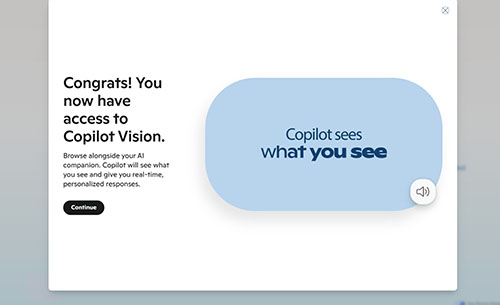 [Click on image for larger view.] Figure 1. This is what happens when you receive access to Copilot Vision.
When I first heard about Copilot Vision, I feared that it was basically a lite version of Windows Recall, baked into the browser. In retrospect, it seems that Copilot Vision is not as invasive as Windows Recall.
According to Microsoft, Copilot Vision is an entirely opt in experience, meaning that it isn’t going to analyze Web content unless you ask it to. Microsoft goes on to say that, “once you end a session with Vision, all data about what you say and the context you share with Copilot is deleted” and that, “Only Copilot’s responses are logged to improve our safety systems.”. Microsoft has also made a point of noting that it is not capturing data from Website owners (publishers) in an effort to train its AI models.
Personally, the idea of Copilot Vision doesn’t really appeal to me and it’s not the sort of thing that I could see myself using. Even so, I don’t think that Copilot Vision is going to end up being problematic from a privacy standpoint. It is worth noting however, that while Windows Recall data is stored and analyzed locally, Copilot Vision, when invoked, does send browsing data to the cloud for analysis.
If you are like me and you don’t want to use Copilot Vision, then the only way that I have found for completely disabling it is to turn off Copilot within the Edge browser. To do so, open Settings and then click on Copilot and Sidebar. Next, click on Copilot and then turn off the option to show the Copilot button on the toolbar, as shown in Figure 2.
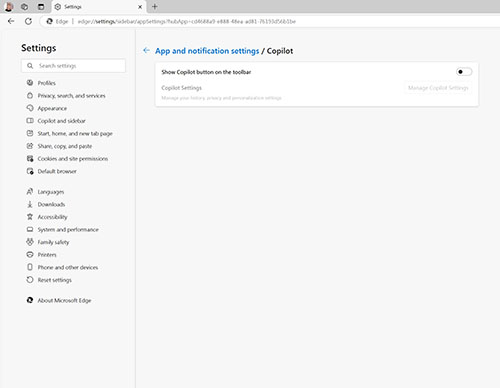 [Click on image for larger view.] Figure 2. You can disable the Copilot button within the Edge browser.
About the Author
Brien Posey is a 22-time Microsoft MVP with decades of IT experience. As a freelance writer, Posey has written thousands of articles and contributed to several dozen books on a wide variety of IT topics. Prior to going freelance, Posey was a CIO for a national chain of hospitals and health care facilities. He has also served as a network administrator for some of the country's largest insurance companies and for the Department of Defense at Fort Knox. In addition to his continued work in IT, Posey has spent the last several years actively training as a commercial scientist-astronaut candidate in preparation to fly on a mission to study polar mesospheric clouds from space. You can follow his spaceflight training on his Web site.