Posey's Tips & Tricks
Microsoft's Latest Backup Prompt May Cause Unforeseen Problems
Microsoft's new Windows 11 backup prompt, intended as a helpful reminder, may instead disrupt critical workflows by reappearing persistently and even blocking system access after reboots.
In recent weeks, I have been reading a lot of complaints in online forums regarding Microsoft's recent practice of placing a yellow banner in Settings, nagging Windows 11 users to back up their PCs. If you have not yet seen this backup prompt, you can see what it looks like in Figure 1.
 [Click on image for larger view.] Figure 1. Microsoft has added a banner to Settings, advising you to back up your PC.
It's worth noting that although the backup banner seems to be the banner that is drawing the most attention, Microsoft has been displaying other banners on the Settings screen as of late. As an example, Figure 2 shows a banner prompting you to add a recovery phone number to your account.
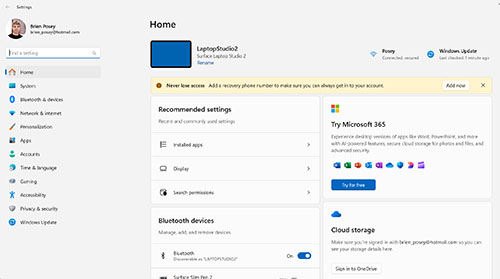 [Click on image for larger view.] Figure 2. Microsoft has begun displaying yellow banners within Settings.
Honestly, I don't really have a problem with Windows 11 displaying a backup prompt banner within Settings, so long as there is a way to dismiss the banner and keep it from coming back. I would also like to see Microsoft create a group policy setting (if such a setting doesn't already exist) that can be used to suppress banner notifications. I record a lot of video courseware and unexpected popups or banners ruin recordings, forcing me to start over. Recordings aside though, the banners really aren't a big deal to me.
Of course there are some very vocal critics of Microsoft's new banners. The online critics seem to take issue with Microsoft on two main points. First, dismissing the banner allegedly does not make the banner permanently go away. I have read several online posts from those who claim to have dismissed the backup notification, only to have it allegedly reappear a few days later.
The other issue that the critics seem to have with the banner is that it could be thought of as being an advertisement in disguise. After all, the banner prompt tries to get you to back up your PC to OneDrive. Although OneDrive comes with 5 GB of space, many people have far more than 5 GB of data. As such, the backup prompt might be less of a friendly reminder and more of a strategy to get customers to spend money on OneDrive storage.
As previously mentioned, I don't really have a problem with the banner prompt, so long as there is a way to get rid of it. What I do have a problem with however, is another way that Microsoft is trying to push customers into backing their PCs up to OneDrive. Let me explain.
Recently, I have been doing a lot of work related to large language models and generative AI. In doing so, I have been experimenting with running various large language models on my own hardware. As you can imagine, some of these large language models are extremely resource intensive, so I quickly realized that I needed to run them on dedicated hardware.
My first instinct was to add another server to my rack and use that server for hosting AI models. The problem however, is that I work out of my home and residential electric service was never intended to handle large IT racks. I am dangerously close to overloading the circuit, so adding another server to my rack was out of the question. My only other option was to build a high end gaming PC with lots of memory and a powerful GPU, and stash it in an out of the way place in another room.
Since this particular PC is essentially performing the role of a server, I didn't bother to connect a keyboard, mouse, or monitor once the initial configuration process was complete. Besides, the location where I had to install the PC isn't really big enough for me to add a monitor.
I created a custom PowerShell app that interacts with the AI models installed on the remote machine through a series of API calls and for about the first week everything worked out great. Then one day I tried to use my app and received a long stream of errors, as shown in Figure 3.
 [Click on image for larger view.] Figure 3. My application generated a series of errors.
At first, I thought that there was a problem with my application. After doing some testing though, I realized that the application was unable to access the PC that was running the AI software. I tried establishing an RDP session with the PC, but was unable to communicate with it.
At this point, I had no choice but to stop what I was doing, move the PC to another location, attach a keyboard, mouse, and monitor, and see if I could figure out what was going on. The problem was that Windows 11 had installed an update and rebooted the PC. That normally would not be a problem except that the update caused Windows 11 to display the nag screen shown in Figure 4. The screen was designed in a way that prevented me from accessing the logon prompt until after I cleared the message. Hopefully, the message won't come back.
 [Click on image for larger view.] Figure 4. Windows 11 won't let you log on until you clear this message.
I can't say for sure that this message was the source of my problems. It could have been a coincidence. However, the sudden appearance of a message that has to be cleared prior to logging in does seem to be the most likely cause.
While I am not necessarily opposed to Microsoft displaying an occasional reminder to back up your PC, I have a huge issue with nag screens that prevent applications from being able to function (assuming that is truly what is going on). Admittedly, this was at least partially my fault for not running my large language models on a server operating system. Even so, I never expected a Windows nag screen would prevent me from logging on.
About the Author
Brien Posey is a 22-time Microsoft MVP with decades of IT experience. As a freelance writer, Posey has written thousands of articles and contributed to several dozen books on a wide variety of IT topics. Prior to going freelance, Posey was a CIO for a national chain of hospitals and health care facilities. He has also served as a network administrator for some of the country's largest insurance companies and for the Department of Defense at Fort Knox. In addition to his continued work in IT, Posey has spent the last several years actively training as a commercial scientist-astronaut candidate in preparation to fly on a mission to study polar mesospheric clouds from space. You can follow his spaceflight training on his Web site.