Joey on SQL Server
Why Azure SQL Database Hyperscale Is Not Just for Massive Workloads
Hyperscale combines strong write performance, flexible storage and fast replica creation for databases of nearly any size.
- By Joey D'Antoni
- 07/21/2026
Managed Instance, Cosmos DB, SQL Azure, Azure Table Storage, Databricks, Fabric -- Microsoft, as we all know, struggles to name its products clearly. Unclear naming can lead to customer confusion. I remember working the Azure SQL booth at Microsoft Ignite, where I think I had to explain the differences among Managed Instance, SQL Server in a virtual machine (VM), and Azure SQL Database about 300 times a week. In this month's column, I wanted to focus on one data platform product: Azure SQL Database Hyperscale.
Before we drill into Hyperscale, let's do a brief refresher on Azure SQL Database. The service is best suited for newly developed databases but is largely compatible with SQL Server, with two big exceptions: you can't do cross-database queries (with three- or four-part naming), and you can't use common language runtime (CLR) functions.
Azure SQL Database comes in three service models: general purpose, business critical, and Hyperscale. There's also a serverless flavor of both general-purpose and Hyperscale, which allows for auto-scaling. In the general-purpose service tier, a serverless database auto-pauses when not in use (which stops incurring compute costs), which is not currently available on the Hyperscale tier, but Microsoft has stated that it is planned for a future release. Both general-purpose and business-critical use hardware architectures familiar to many DBAs. General-purpose is much like an SQL Server Failover Cluster Instance with shared storage and a VM that can fail over quickly. Business critical uses the same technology as Always On availability groups to allow for both high availability and readable secondary replicas. Hyperscale, on the other hand, uses a completely unique cloud architecture.
I really like Hyperscale for a lot of reasons, but let me highlight a few of them. Hyperscale is one of the few platform-as-a-service database offerings that decouple storage costs from compute costs. I remember a customer having to double their spend on Managed Instance because their data crossed over the 8 TB threshold, so the only option was to move to a business-critical tier with many more unneeded CPU cores, which more than doubled their monthly costs. In Hyperscale, the data would have been billed at the storage price, which is about $140/TB/month. Another thing I like about Hyperscale is that if you've used a cloud PaaS database with a busy application, you'll know transaction log write throughput is the biggest performance limiter. Hyperscale writes to the log at a minimum of 100 MB/second, and up to 150 MB/seconds in higher tiers. You'd need a minimum of a 10-core business-critical database to get close to that on the standard tiers of Azure SQL Database.
How does Hyperscale get its log throughput gains? Remember when SQL Server introduced the buffer pool extension feature in SQL Server 2014? This feature extended SQL Server's buffer pool onto a local SSD drive. Hyperscale uses that idea with horizontally scaled page servers, each with its own SSD cache, plus a distributed yet persisted transaction log architecture. A log service quickly propagates those changes to the page servers. For recovery and long-term storage, the log is persisted into Azure storage. Since Hyperscale leverages Azure storage, you can quickly create readable secondaries (named replicas) and they share the same page servers as your read-write database.
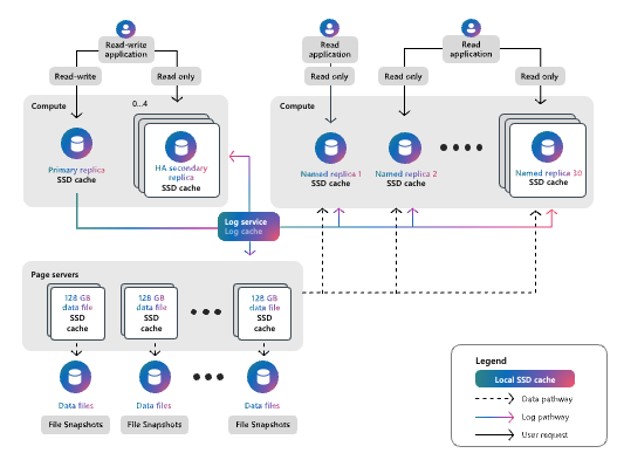 Figure 1.
You also have the option to create a high-availability (HA) secondary to provide higher availability to your Hyperscale service. The main differences between HA replicas and named (read) replicas are that named replicas can be on a different service tier and have a different database name from the primary replica. Additionally, named replicas support up to 30 replicas (as opposed to 4 for HA) and allow different authentication by using different logins and firewall rules in the Azure SQL logical server layer. These replicas are created using snapshot technology and are available nearly instantly. The concept of snapshots is also used for point-in-time restore, which allows for multi-terabytes databases to be restored in minutes.
You might think Hyperscale is only for the largest workloads -- after all, the name implies as much, and when I asked my favorite LLM, it told me the same. Hyperscale works just as well with 1 GB (well, technically 10, which is the minimum size) of data as with 50 TB. While the early pricing was more expensive than general-purpose, Microsoft has removed the SQL Server licensing component, bringing the cost more in line with general-purpose while offering much better write performance.
Azure SQL Database Hyperscale shares the same SQL Server engine that all other Azure SQL Database offerings use. The same limitations, like no cross-database query, no common language runtime (CLR), and my big stumbling block, not being able to restore an existing SQL Server database onto the platform. There are migration tools available -- but all struggle with large (> 100 GB) volumes and require a higher degree of downtime than a native database backup solution would incur.
I've been working with Azure SQL Database since it was called SQL Azure, when the maximum database size was 5 GB. Hyperscale is the SKU I recommend to nearly all my clients -- it's much cheaper than business critical, and storage being a separate pricing dimension from compute means you don't have to worry about massive cost increases just because your data volume increases. For general purpose, it's $736 a month; for hyperscale it's $533 a month; and for business critical, it's $1983 a month.
These are "bring your own licenses" prices with no discounts. Cloud pricing has a lot of dimensions and complexity -- know that Hyperscale may cost slightly more than general purpose, but it offers better performance, and as your data grows, your costs will scale linearly, and not exponentially, and you continue to grow storage without having to increase your compute costs. If you need compute, however Hyperscale can still grow compute to 192 cores, with the read replicas to offload that workflow. One additional pricing note: in a zone-redundant configuration, Hyperscale compute costs double, while General Purpose sees a smaller increase. For our four-core example, zone-redundant Hyperscale would cost $1,066 versus $1,003 for General Purpose.
Just yesterday, I was talking with one my MVP colleagues, and she said, "you only use Hyperscale for very large databases, right?" If you have one takeaway from this column is that Hyperscale is mostly like the best Azure database platform no matter how big (or small) your database is. The most limiting dimension of cloud database services like Azure SQL has been write performance. While there's nothing wrong with the other service tiers, Hyperscale has a unique, horizontally scaling cloud architecture, that delivers the write performance of much more expensive business critical tiers. Beyond performance, the ability to rapidly create multiple read replicas, allows for various data consumers to report, analyze, dissect data without impacting the production read/write workload. Finally, remember -- you can expand your storage without expanding CPUs.
About the Author
Joseph D'Antoni is an Architect and SQL Server MVP with over two decades of experience working in both Fortune 500 and smaller firms. He holds a BS in Computer Information Systems from Louisiana Tech University and an MBA from North Carolina State University. He is a Microsoft Data Platform MVP and VMware vExpert. He is a frequent speaker at PASS Summit, Ignite, Code Camps, and SQL Saturday events around the world.