| Service |
Product |
Savings Plan Discount (1 yr) |
Reservation Discount (1 yr) |
| Azure Database for PostgreSQL |
Flexible Server (all generations) |
20% |
40% |
| Azure Database for MySQL |
|
20% |
40% |
| Azure Documents DB |
N/A |
20% |
N/A |
| Azure Cosmos DB |
N/A |
12% |
15-34% |
| Azure SQL |
Provisioned |
20% |
15-34% |
|
Serverless |
35% |
N/A |
|
Hourly licenses |
20% |
N/A |
| Azure DB Migration Service |
N/A |
35% |
N/A |
| SQL on Azure VMs |
Hourly license |
0% |
N/A |
| Arc-enabled SQL Server |
Hourly license |
0% |
N/A |
In addition to being more flexible, the pricing model, even with all these different percentages, is much simpler and easier to digest than reservations. Reservations for Azure SQL Database, for example, have different discount percentages based on your service tier (hyperscale, general purpose, business critical), and Cosmos DB has a sliding discount based on your request unit (RU) consumption. Savings plans are much simpler, and the discount is consistent across SKUs and usage.
You might be wondering why there are 0% discounts for SQL Server on Azure VMs and Arc-enabled SQL Server (which would run in another cloud or on-premises)—I know I had the same question for Microsoft. The answer is that using those VMs counts towards your commitment for the savings plan. An example of where you might use this is if you were migrating from SQL Server to Azure SQL Managed Instance. The VM usage would count towards your utilization commitment while your migration was in place. While this is a bit of an edge case, Microsoft really wanted to cover the notion of data platform migration and modernization with this effort.
Another thing I think will drive customers to use savings plans is that, because of Azure capacity limitations in popular regions like East US, UK South, and West US, I increasingly see customers having to deploy workloads across multiple regions. Savings plans with flexibility across regions mean your savings aren’t bound by region or service.
Savings plans are applied to your Azure bill by discounting the service with the highest percentage discount first. Since you are committing to a specific dollar amount per hour, it doesn't matter which database you use; the billing system will apply the one with the highest discount. For example, if you had a serverless Azure SQL DB (35 percent) and an Azure Database for PostgreSQL (20 percent) running, your commitment and discount would apply to the serverless Azure SQL DB, and the discount would be reflected in the per-hour cost on your Azure bill. Having multiple services from the Azure Database portfolio and supporting all SKUs allows for the greatest flexibility in utilizing savings plans. You can see that illustrated in Figure 1 below.
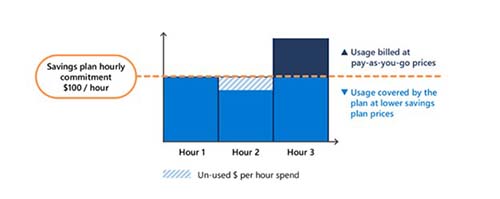 [Click on image for larger view.]
Figure 1. Savings plans for databases illustrated (courtesy Microsoft)
[Click on image for larger view.]
Figure 1. Savings plans for databases illustrated (courtesy Microsoft)
While there are storage reservations in Azure (starting at 100 TB/month), they do not apply to database storage, including on Azure VMs (storage reservations apply to storage accounts, not managed disks). Additionally, savings plan discounts are only available (as with reservations) for vCore-based Azure SQL Database (not the legacy DTU-based SKUs) due to their hourly billing. You can see that pricing dimensionality from the Azure portal in Figure 2 below -- the vCore cost component of $184.09 would be eligible for the discount, while the storage costs of $665.60 would not be.
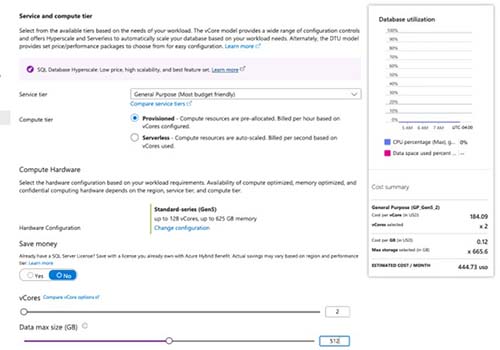 [Click on image for larger view.]
Figure 2. Screenshot of Azure SQL Database pricing from the Azure Portal
[Click on image for larger view.]
Figure 2. Screenshot of Azure SQL Database pricing from the Azure Portal
Another minor variation in the way savings plans work is that Azure SQL Database serverless cost savings depend on usage -- the 35 percent discount is compared to serverless running full-time at the full pay-as-you-go rate, rather than the one-year savings plan. You may be wondering where Cosmos DB serverless fits into this -- like the DTU SKUs of Azure SQL Database, those databases are not eligible for savings plans because of their billing model.
The below is a sample customer who runs six Azure database workloads across their production, reporting, and development environments. All resources are deployed in the East US region. This analysis shows the impact of enrolling in a savings plans for databases commitment.
Detailed Compute Cost Breakdown
| Service and Configuration |
Use Case |
Monthly PAYG (Compute Only) |
Savings Plan Discount |
Monthly Cost w/ Savings Plan |
Monthly Savings |
| Azure SQL Database (GP, 8 vCore, Gen5 Provisioned) |
ERP / Line-of-business |
$1,162.16 |
20% |
$929.73 |
$232.43 |
| Azure SQL Database (GP, 4 vCore, Gen5 Provisioned |
Reporting database |
$736.57 |
20% |
$589.26 |
$147.31 |
| Azure SQL Database (Serverless, max 4 vCore |
Dev/test environment |
$385.00 |
35% |
$250.25 |
$134.75 |
| Azure Database for PostgreSQL (GP, 8 vCore D8ds v4 Flex Server) |
Customer-facing Web app |
$654.08 |
20% |
$523.26 |
$130.82 |
| Azure Database for MySQL (GP, 4 vCore D4ds v4 Flex Server) |
Internal tooling/CMS |
$327.04 |
20% |
$261.63 |
$65.41 |
| Azure Cosmos DB (20,000 RU/s provisioned, NoSQL API) |
Mobile app API backend |
$1,168.00 |
12% |
$1,027.84 |
$140.16 |
| Total Compute |
|
$4,432.85 |
19.2% blended |
$3,581.97 |
$850.88 |
All hourly rates sourced from azure.microsoft.com pricing pages (East US, license-included, PAYG). Monthly = 730 hours. Serverless estimated at average ~2 vCore sustained utilization.
Annual Cost Summary
|
Pay -As-You-Go |
With 1-Year Savings Plan |
| Annual Comupte Cost |
$53,194 |
$42,984 |
| Annual Storage Cost (estimated) |
$2,232 |
$2,232 (no discount) |
| Total Annual Spend |
$55,426 |
$45,216 |
| Annual Savings |
|
$10,211 |
Cost management and database licensing aren't very popular topics at technology conferences. However, as soon as your VP or CFO gets their first cloud bill, there are usually immediate discussions around how much everything costs. Databases are one of the most expensive infrastructure components, so they are always heavily evaluated for cost savings. Having savings plans for databases available in Azure gives you additional ways to save compared to just using reservations, which may save you some more money, but limit flexibility. | | |